01Why Figma splits your export
Figma, like every browser canvas, tops out at 32,767px per side. Anything taller gets cut, and you end up exporting slices by hand and gluing them together in another app.
Select one layer and export. The plugin cuts the frame into slices Figma can render, then rebuilds a single image file from them.
No hairline seams. Slice boundaries snap to whole pixels, so the joins don't show in the merged file.
No round trip to Photoshop. The file is assembled inside the plugin and downloaded as one PNG.
02How it works
Three steps, one file out.
-
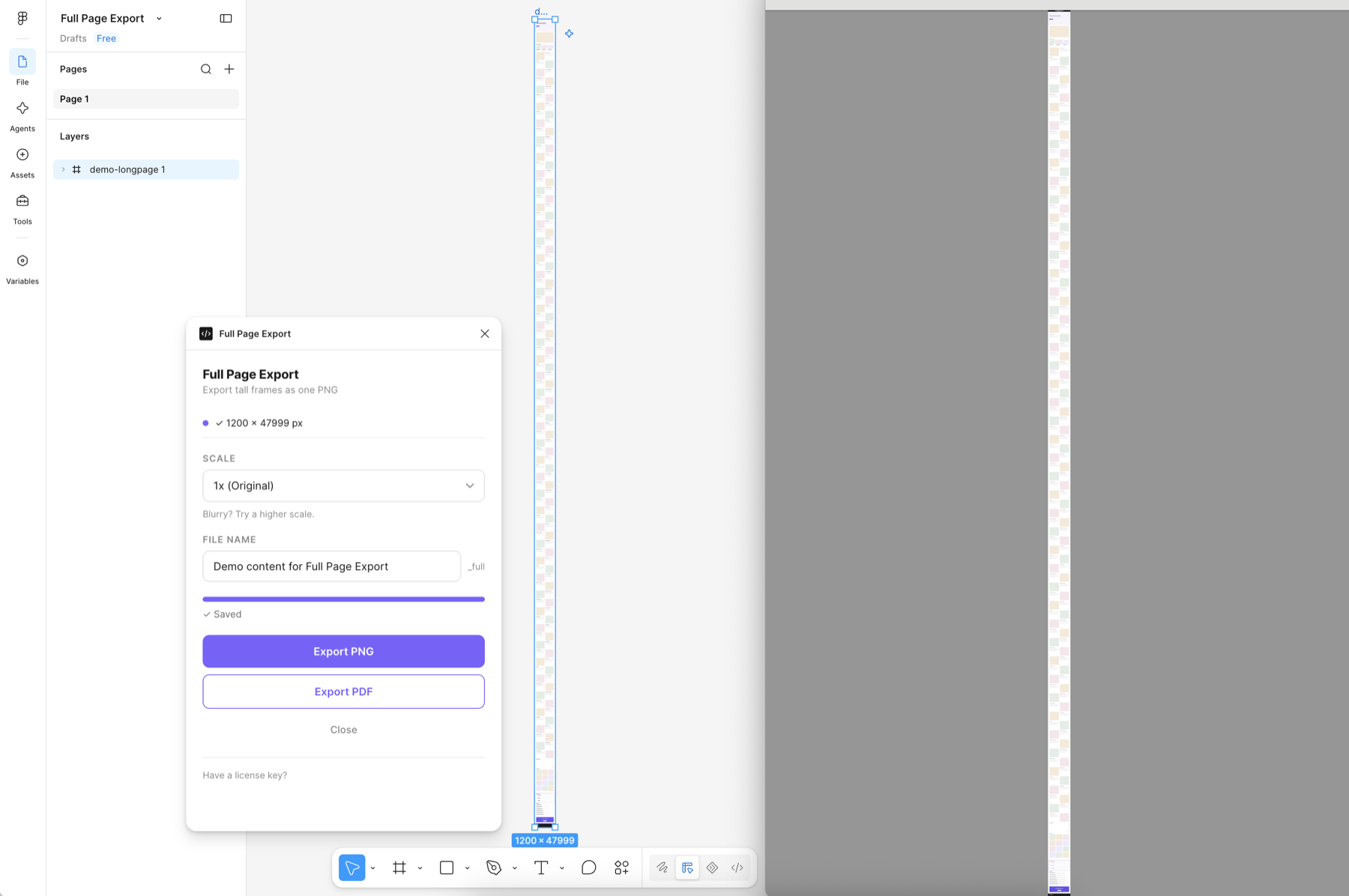
Select the frame Pick the one layer you want exported. The panel shows its pixel size so you can confirm.
-
Choose a scale 1X or 2X on every plan. Max adds 0.5X to 3X and an exact pixel width.
-
Export PNG Slices are captured and merged into one file, then downloaded. The filename is picked up from your layer naming automatically.
Full Page Export
Export tall frames as one PNG
Blurry? Try a higher scale.
Try it: switch plans, pick a scale, type a width. Nothing is exported here.
03What you get
Built for people who ship long pages every week: e-commerce detail pages, landing pages, case studies.
- One continuous PNG
- Merged top to bottom. Nothing to assemble afterwards.
- Exact pixel widthMax
- Marketplaces expect a fixed width. Type 860 and get 860. Save the widths you use often and reuse them with one click.
- Seven scale stepsMax
- 0.5X to 3X. Scale down for the web, or up so the page stays sharp when zoomed in. Free includes 1X and 2X.
- Automatic filenames
- Taken from your layer names, so batches of pages stay organised.
- Works on huge canvases
- The merge runs slice by slice, so memory stays manageable well past 32,767px.
- Nothing leaves your machine
- Rendering and merging happen locally. Your artwork is never uploaded.
- A license, not a subscription
- Pay once, activate with a key. Move it to another machine whenever you need to.
04Pricing
Try it free, then unlock with a single payment. The license never expires and there is nothing to renew. Keys are delivered by email and activate instantly, so an activated key can't be returned. Please try the free version on your own file first.
No account needed
- Unlimited exports
- Single PNG output
- 1X and 2X scale
- Watermark added to output
- 1.2X scale
- 0.5X – 3X and custom width
For everyday page exports
- Everything in Free
- No watermark
- Single PNG output
- 1X, 1.2X and 2X scale
- 0.5X – 3X and custom width
Everything unlocked in one purchase
- Everything in Pro
- Exact pixel width — type 860, get 860
- Save the widths you use often
- 7 scale steps — 0.5X to 3X
- 3X for print and close zoom
Compare plans
| Feature | Free$0 | Pro$9 | Max$29 |
|---|---|---|---|
| Export | |||
| Frames past Figma's 32,767px limit | |||
| One continuous PNG, no seams | |||
| Number of exports | Unlimited | Unlimited | Unlimited |
| Watermark bar on the output | Added | ||
| File name | Automatic | Editable | Editable |
| Scale | |||
| 1X · 2X | |||
| 1.2X | |||
| 1.5X · 3X | |||
| 0.5X · 0.75X (scale down for web) | |||
| Exact pixel width (type 860, get 860) | |||
| Saved width presets | |||
| License | |||
| Payment | None | One-time | One-time |
| License expiry | Never | Never | |
| Computers per license | 3 | 3 | |
| Move the license to another machine | |||
| Artwork stays on your machine | |||
05Questions
How tall can a page be?
Well past Figma's own limit. The plugin cuts the frame into vertical slices, exports each one, and rebuilds the image file directly — so height is bounded by your machine's memory rather than by the 32,767px canvas ceiling.
What does the free version do?
Everything, with a watermark bar added to the top of the exported file and scales limited to 1X and 2X. It is meant to let you confirm the export works on your own files before paying.
Is this a subscription?
No. Pro and Max are one-time purchases. You receive a license key after checkout and enter it in the plugin panel to activate.
Can I get a refund?
The license key is delivered by email and unlocks the plugin the moment you activate it, so an activated key cannot be returned — please use the free version first to confirm the export works on your own files. Checkout and billing are handled by Lemon Squeezy as the merchant of record, and their refund policy applies to your order. If the plugin is not working as described, email hello@northpixelhq.com — we would rather fix it or refund you than leave you with something you cannot use.
Can I use my license on more than one computer?
A license is activated per machine. You can deactivate it from inside the plugin and then activate it somewhere else, so moving to a new computer is straightforward.
Does my design get uploaded anywhere?
No. Rendering and merging happen locally inside Figma. The only network request the plugin makes is to the payment provider to check your license key.
Something isn't working. How do I get help?
Email hello@northpixelhq.com with the file size you were exporting and what you saw. Replies usually go out within a couple of business days.
Try it on your longest page.
The free version does everything, with a watermark bar.